Section 5.5 Collaboration
Writing a book will almost surely involve more than a single person. You may have co-authors, and readers who give you feedback from time to time.
Since all book chapters are plain-text files, they are perfect for version control tools, which means if all your co-authors and collaborators have basic knowledge of a version control tool like GIT, you can collaborate with them on the book content using these tools. In fact, collaboration with GIT is possible even if they do not know how to use GIT, because GitHub has made it possible to create and edit files online right in your web browser. Only one person has to be familiar with GIT, and that person can set up the book repository. The rest of the collaborators can contribute content online, although they will have more freedom if they know the basic usage of GIT to work locally.
Readers can contribute in two ways. One way is to contribute content directly, and the easiest way, is through GitHub pull requests if your book source is hosted on GitHub. Basically, any GitHub user can click the edit button on the page of an Rmd source file, edit the content, and submit the changes to you for your approval. If you are satisfied with the changes proposed, you can click a “Merge” button to merge the changes. If you are not satisfied, you can provide your feedback in the pull request, so the reader can further revise it according to your requirements. We mentioned the edit button in the GitBook style in Subsection 3.1.1. That button is linked to the Rmd source of each page, and can guide you to create the pull request. There is no need to write emails back and forth to communicate simple changes, such as fixing a typo. The Rmd source links to GitHub’s pull-request help page at
help.github.com/articles/about-pull-requests/.
Another way for readers to contribute to your book is to leave comments. Comments can be left in multiple forms: emails, GitHub issues, or HTML page comments. Here we use Disqus (see Section 4.1) as an example. Disqus is a service to embed a discussion area on your web pages, and can be loaded via JavaScript. You can find the JavaScript code after you register and create a new forum on Disqus, which looks like this:
<div id="disqus_thread"></div>
<script>
(function() { // DON'T EDIT BELOW THIS LINE
var d = document, s = d.createElement('script');
s.src = '//yihui.disqus.com/embed.js';
s.setAttribute('data-timestamp', +new Date());
(d.head || d.body).appendChild(s);
})();
</script>
<noscript>Please enable JavaScript to view the
<a href="https://disqus.com/?ref_noscript">
  comments powered by Disqus.</a></noscript>
Note that you will need to replace the name
yihui with your own forum name. You can save the code to an HTML file named, for example, disqus.html. Then you can embed it at the end of every page via the after_body option (see Figure 5.5.1 for what the discussion area looks like):
---
output:
  bookdown::gitbook:
    includes:
      after_body: disqus.html
---
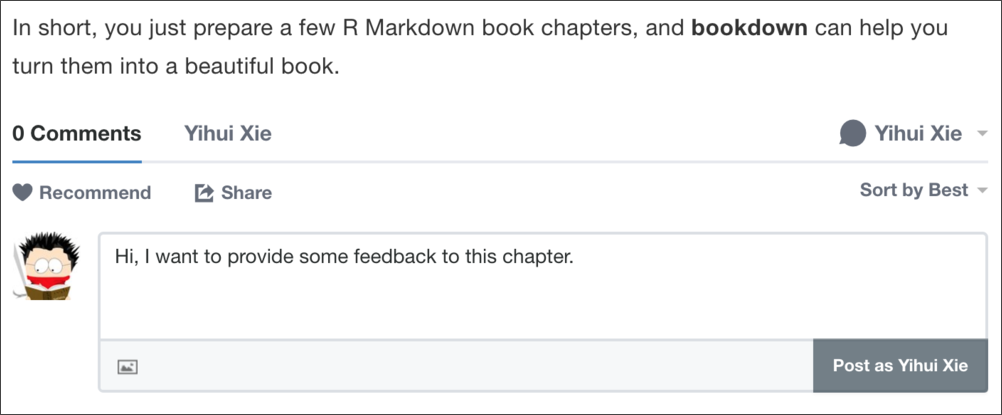
A screenshot showing a discussion area embedded at the bottom of a book page.

