Section 5.4 RStudio IDE
We recommend that you upgrade your RStudio IDE if your version is lower than 1.0.0. As mentioned in Section 1.3, all R Markdown files must be encoded in UTF-8. This is important especially when your files contain multibyte characters. To save a file with the UTF-8 encoding, you can use the menu
File -> Save with Encoding, and choose UTF-8.
When you click the
Knit button to compile an R Markdown document in the RStudio IDE, the default function called by RStudio is rmarkdown::render(), which is not what we want for books. To call the function bookdown::render_book() instead, you can set the site field to be bookdown::bookdown_site in the YAML metadata of the R Markdown document index.Rmd, e.g.,
---
title: "A Nice Book"
site: bookdown::bookdown_site
output:
  bookdown::gitbook: default
---
When you have set
site: bookdown::bookdown_site in index.Rmd, RStudio will be able to discover the directory as a book source directory, and you will see a button “Build Book” in the “Build” pane. You can click the button to build the whole book in different formats, and if you click the Knit button on the toolbar, RStudio will automatically preview the current chapter, and you do not need to use preview_chapter() explicitly.
The
bookdown package comes with a few addins for RStudio. If you are not familiar with RStudio addins, you may check out the documentation at rstudio.github.io/rstudioaddins/. After you have installed the bookdown package, you will see a dropdown menu on the toolbar named “Addins” and menu items like “Preview Book” and “Input LaTeX Math” after you open the menu.
The addin “Preview Book” calls
bookdown::serve_book() to compile and serve the book. It will block your current R session, i.e., when serve_book() is running, you will not be able to do anything in the R console anymore. To avoid blocking the R session, you can daemonize the server using bookdown::serve_book(daemon = TRUE). Note that this addin must be used when the current document opened in RStudio is under the root directory of your book, otherwise serve_book() may not be able to find the book source.
The addin “Input LaTeX Math” is essentially a small Shiny application that provides a text box to help you type LaTeX math expressions (see Figure 5.4.1). As you type, you will see the preview of the math expression and its LaTeX source code. This will make it much less error-prone to type math expressions - when you type a long LaTeX math expression without preview, it is easy to make mistakes such as
X_ij when you meant X_{ij}, or omitting a closing bracket. If you have selected a LaTeX math expression in the RStudio editor before clicking the addin, the expression will be automatically loaded and rendered in the text box. This addin was built on top of the MathQuill library (http://mathquill.com). It is not meant to provide full support to all LaTeX commands for math expressions, but should help you type some common math expressions.
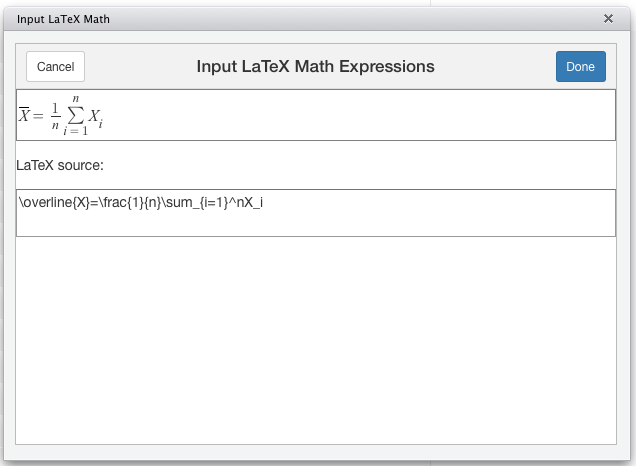
A screenshot of the RStudio addin used to preview LaTeX math input.
There are also other R packages that provide addins to help you author books. The
citr package ([13]) provides an addin named “Insert citations”, which makes it easy to insert citations into R Markdown documents. It scans your bibliography databases, and shows all citation items in a drop-down menu, so you can choose from the list without remembering which citation key corresponds to which citation item (see Figure 5.4.2).
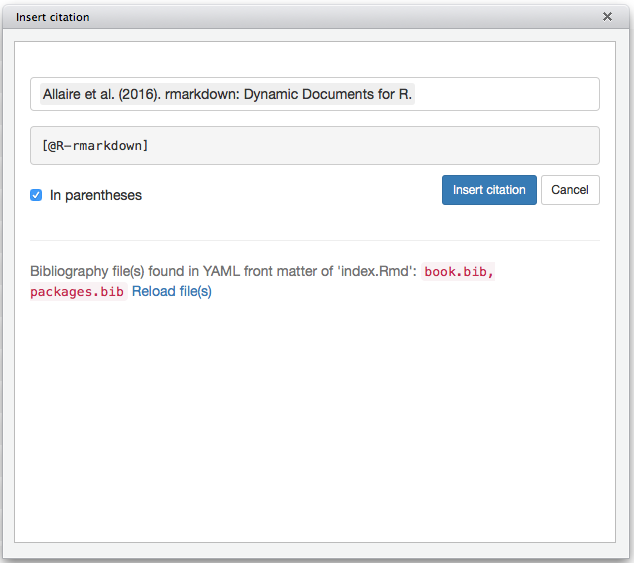
A screenshot of the citation-insertion addin shown in the editing chapter.

