Section 2.5 Tables
For now, the most convenient way to generate a table is the function
knitr::kable(), because there are some internal tricks in knitr to make it work with bookdown, and users do not have to know anything about these implementation details. We will explain how to use other packages and functions later in this section.
Like figures, tables with captions will also be numbered and can be referenced. The
kable() function will automatically generate a label for a table environment, which is the prefix tab: plus the chunk label. For example, the table label for a code chunk with the label foo will be tab:foo, and we can still use the syntax \@ref(label) to reference the table. Table 2.5.1 is a simple example.
knitr::kable(
  head(mtcars[, 1:8], 10), booktabs = TRUE,
  caption = 'A table of the first 10 rows of the mtcars data.'
)
| mpg | cyl | disp | hp | drat | wt | qsec | vs | |
|---|---|---|---|---|---|---|---|---|
| Mazda RX4 | 21.0 | 6 | 160.0 | 110 | 3.90 | 2.620 | 16.46 | 0 |
| Mazda RX4 Wag | 21.0 | 6 | 160.0 | 110 | 3.90 | 2.875 | 17.02 | 0 |
| Datsun 710 | 22.8 | 4 | 108.0 | 93 | 3.85 | 2.320 | 18.61 | 1 |
| Hornet 4 Drive | 21.4 | 6 | 258.0 | 110 | 3.08 | 3.215 | 19.44 | 1 |
| Hornet Sportabout | 18.7 | 8 | 360.0 | 175 | 3.15 | 3.440 | 17.02 | 0 |
| Valiant | 18.1 | 6 | 225.0 | 105 | 2.76 | 3.460 | 20.22 | 1 |
| Duster 360 | 14.3 | 8 | 360.0 | 245 | 3.21 | 3.570 | 15.84 | 0 |
| Merc 240D | 24.4 | 4 | 146.7 | 62 | 3.69 | 3.190 | 20.00 | 1 |
| Merc 230 | 22.8 | 4 | 140.8 | 95 | 3.92 | 3.150 | 22.90 | 1 |
| Merc 280 | 19.2 | 6 | 167.6 | 123 | 3.92 | 3.440 | 18.30 | 1 |
If you want to put multiple tables in a single table environment, wrap the data objects (usually data frames) into a list. See Figure 2.5.2 for an example. Please note that this feature is only available in HTML and PDF output.
knitr::kable(
  list(
    head(iris[, 1:2], 3),
    head(mtcars[, 1:3], 5)
  ),
  caption = 'A Tale of Two Tables.', booktabs = TRUE
)
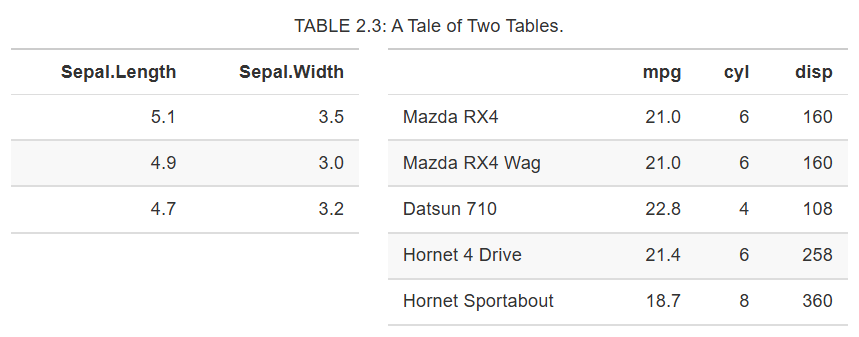
Two tables side by side.
When you do not want a table to float in PDF, you may use the LaTeX package
longtable, which can break a table across multiple pages. To use longtable, pass longtable = TRUE to kable(), and make sure to include \usepackage{longtable} in the LaTeX preamble (see Section 4.1 for how to customize the LaTeX preamble). Of course, this is irrelevant to HTML output, since tables in HTML do not need to float.
knitr::kable(
  iris[1:55, ], longtable = TRUE, booktabs = TRUE,
  caption = 'A table generated by the longtable package.'
)
| Sepal.Length | Sepal.Width | Petal.Length | Petal.Width | Species |
|---|---|---|---|---|
| 5.1 | 3.5 | 1.4 | 0.2 | setosa |
| 4.9 | 3.0 | 1.4 | 0.2 | setosa |
| 4.7 | 3.2 | 1.3 | 0.2 | setosa |
| 4.6 | 3.1 | 1.5 | 0.2 | setosa |
| 5.0 | 3.6 | 1.4 | 0.2 | setosa |
| 5.4 | 3.9 | 1.7 | 0.4 | setosa |
| 4.6 | 3.4 | 1.4 | 0.3 | setosa |
| 5.0 | 3.4 | 1.5 | 0.2 | setosa |
| 4.4 | 2.9 | 1.4 | 0.2 | setosa |
| 4.9 | 3.1 | 1.5 | 0.1 | setosa |
| 5.4 | 3.7 | 1.5 | 0.2 | setosa |
| 4.8 | 3.4 | 1.6 | 0.2 | setosa |
| 4.8 | 3.0 | 1.4 | 0.1 | setosa |
| 4.3 | 3.0 | 1.1 | 0.1 | setosa |
| 5.8 | 4.0 | 1.2 | 0.2 | setosa |
| 5.7 | 4.4 | 1.5 | 0.4 | setosa |
| 5.4 | 3.9 | 1.3 | 0.4 | setosa |
| 5.1 | 3.5 | 1.4 | 0.3 | setosa |
| 5.7 | 3.8 | 1.7 | 0.3 | setosa |
| 5.1 | 3.8 | 1.5 | 0.3 | setosa |
| 5.4 | 3.4 | 1.7 | 0.2 | setosa |
| 5.1 | 3.7 | 1.5 | 0.4 | setosa |
| 4.6 | 3.6 | 1.0 | 0.2 | setosa |
| 5.1 | 3.3 | 1.7 | 0.5 | setosa |
| 4.8 | 3.4 | 1.9 | 0.2 | setosa |
| 5.0 | 3.0 | 1.6 | 0.2 | setosa |
| 5.0 | 3.4 | 1.6 | 0.4 | setosa |
| 5.2 | 3.5 | 1.5 | 0.2 | setosa |
| 5.2 | 3.4 | 1.4 | 0.2 | setosa |
| 4.7 | 3.2 | 1.6 | 0.2 | setosa |
| 4.8 | 3.1 | 1.6 | 0.2 | setosa |
| 5.4 | 3.4 | 1.5 | 0.4 | setosa |
| 5.2 | 4.1 | 1.5 | 0.1 | setosa |
| 5.5 | 4.2 | 1.4 | 0.2 | setosa |
| 4.9 | 3.1 | 1.5 | 0.2 | setosa |
| 5.0 | 3.2 | 1.2 | 0.2 | setosa |
| 5.5 | 3.5 | 1.3 | 0.2 | setosa |
| 4.9 | 3.6 | 1.4 | 0.1 | setosa |
| 4.4 | 3.0 | 1.3 | 0.2 | setosa |
| 5.1 | 3.4 | 1.5 | 0.2 | setosa |
| 5.0 | 3.5 | 1.3 | 0.3 | setosa |
| 4.5 | 2.3 | 1.3 | 0.3 | setosa |
| 4.4 | 3.2 | 1.3 | 0.2 | setosa |
| 5.0 | 3.5 | 1.6 | 0.6 | setosa |
| 5.1 | 3.8 | 1.9 | 0.4 | setosa |
| 4.8 | 3.0 | 1.4 | 0.3 | setosa |
| 5.1 | 3.8 | 1.6 | 0.2 | setosa |
| 4.6 | 3.2 | 1.4 | 0.2 | setosa |
| 5.3 | 3.7 | 1.5 | 0.2 | setosa |
| 5.0 | 3.3 | 1.4 | 0.2 | setosa |
| 7.0 | 3.2 | 4.7 | 1.4 | versicolor |
| 6.4 | 3.2 | 4.5 | 1.5 | versicolor |
| 6.9 | 3.1 | 4.9 | 1.5 | versicolor |
| 5.5 | 2.3 | 4.0 | 1.3 | versicolor |
| 6.5 | 2.8 | 4.6 | 1.5 | versicolor |
Pandoc supports several types of Markdown tables, such as simple tables, multiline tables, grid tables, and pipe tables. What
knitr::kable() generates is a simple table like this:
Table: A simple table in Markdown.

 Sepal.Length   Sepal.Width   Petal.Length   Petal.Width
-------------  ------------  -------------  ------------
           5.1           3.5            1.4           0.2
           4.9           3.0            1.4           0.2
           4.7           3.2            1.3           0.2
           4.6           3.1            1.5           0.2
           5.0           3.6            1.4           0.2
           5.4           3.9            1.7           0.4
You can use any types of Markdown tables in your document. To cross-reference a Markdown table, it must have a labeled caption in the form
Table: (\#label) Caption here, where label must have the prefix tab:, e.g., tab:simple-table.
If you decide to use other R packages to generate tables, you have to make sure the label for the table environment appears in the beginning of the table caption in the form
(\#label) (again, label must have the prefix tab:). You have to be very careful about the portability of the table generating function: it should work for both HTML and LaTeX output automatically, so it must consider the output format internally (check knitr::opts_knit$get('rmarkdown.pandoc.to')). When writing out an HTML table, the caption must be written in the <caption></caption> tag. For simple tables, kable() should suffice. If you have to create complicated tables (e.g., with certain cells spanning across multiple columns/rows), you will have to take the aforementioned issues into consideration.

