Section 16.9 Write books and long-form reports with bookdown
The bookdown package [6] is designed for creating long-form documents that are composed of multiple R Markdown documents. For example, if you want to write a book, you can write each chapter in its own Rmd file, and use bookdown to compile these Rmd files into a book.
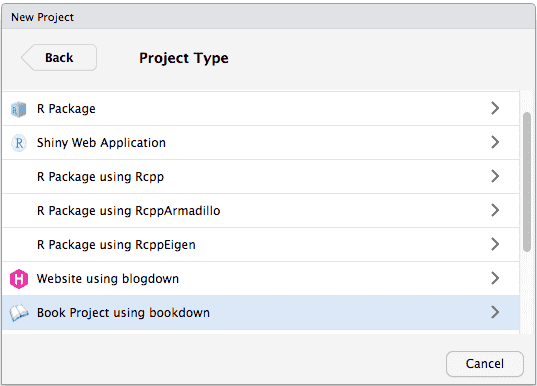
For RStudio users, the easiest way to get started is to create a bookdown project with the IDE by selecting
File -> New Project -> New Directory -> Book Project using bookdown, as you can see from Figure 16.9.1.
If you do not use RStudio or if you prefer to work from the console, you may produce the same result by calling the function
bookdown:::bookdown_skeleton('your-book-dir').
To demonstrate the usage, we provide a minimal example consisting of three files within the same directory:
directory
  |- index.Rmd
  |- 01-intro.Rmd
  |- 02-analysis.Rmd
Below we show the content of each file and explain their roles.
-
index.Rmd:
---
title: "A Minimal bookdown Project"
site: bookdown::bookdown_site
output: bookdown::gitbook
---

# Preface {-}

Some content
The first file is typically calledindex.Rmd. It should be the only Rmd file in which you provide the YAML frontmatter. It should also include a special YAML fieldsite: bookdown::bookdown_site, so that rmarkdown knows to use bookdown to build all Rmd files, instead of rendering a single Rmd file. You can use any bookdown output formats, such asbookdown::gitbook,bookdown::pdf_book,bookdown::word_document2, andbookdown::epub_book. -
01-intro.Rmd:
# Chapter 1 This is chapter 1. -
02-analysis.Rmd:
# Chapter 2

This is chapter 2.
To render these Rmd files, you should call
bookdown::render_book('index.Rmd') instead of rmarkdown::render(). Under the hood, bookdown merges all Rmd files into a single Rmd by default and compiles it. Files are merged in alphabetical order. That is why we added numeric prefixes to filenames in the above example.

