Chapter 9 Community Formats
Most output formats introduced in this book are created and maintained by the RStudio team. In fact, other members in the R community have also created a number of R Markdown output formats. We mention those formats that we are aware of in this chapter. If you have developed or know other formats, please feel free to suggest that we add them to the page https://rmarkdown.rstudio.com/formats.html.
Section 9.1 Lightweight Pretty HTML Documents
When designing the rmarkdown package, we wished it could produce output documents that look pleasant by default, especially for HTML documents. Pandoc does not really style the HTML documents when converting Markdown to HTML, but rmarkdown does. As we mentioned in Subsection 4.1.3, the themes of HTML documents are based on Bootswatch, which actually relies on the Bootstrap library (https://getbootstrap.com). Although these themes look pretty, the major disadvantage is that their file sizes are relatively large. The size of an HTML document created from an empty R Markdown document with the
html_document format is about 600Kb, which is roughly the total size of all CSS, JavaScript, and font files in the default theme.
If you are concerned about the file size but still want a fancy theme, you may consider the prettydoc package [23], which has bundled a few pretty themes (yet small in size). This package provides an output format
prettydoc::html_pretty. An empty R Markdown document with this format generates an HTML file of about 70Kb.
Subsection 9.1.1 Usage
-
The
themeoption takes different values. The currently supported themes are"cayman","tactile","architect","leonids", and"hpstr". Figure 9.1 shows the appearance of theleonidstheme. See https://github.com/yixuan/prettydoc for screenshots of more themes.
Below is an example of the YAML metadata of an R Markdown document that uses the
prettydoc::html_pretty output format:
---
title: "Your Document Title"
author: "Document Author"
date: "2018-04-16"
output:
  prettydoc::html_pretty:
    theme: leonids
    highlight: github
---
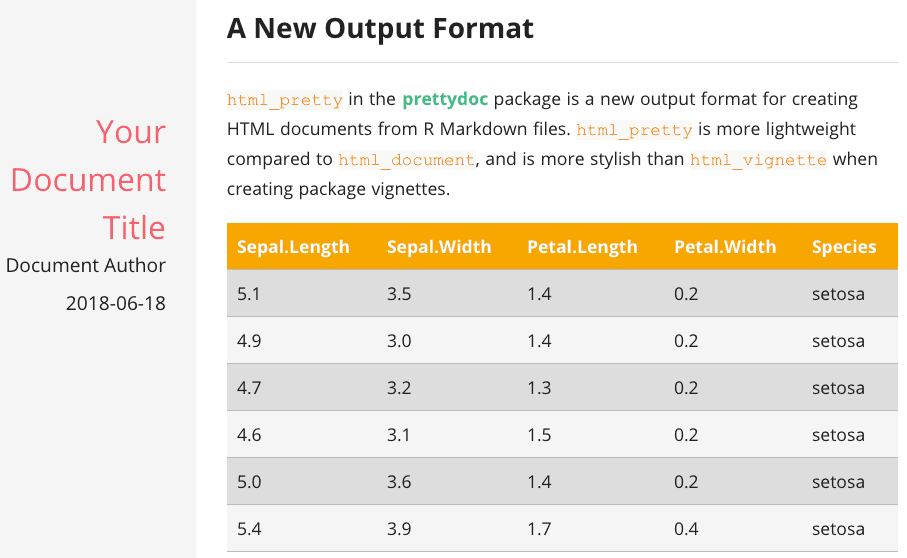
The leonids theme of the prettydoc package.
Subsection 9.1.2 Package vignettes
The
prettydoc::html_pretty can be particularly useful for R package vignettes. We have mentioned the html_vignette format in Section 3.8 that also aims at smaller file sizes, but that format is not as stylish. To apply the prettydoc::html_pretty format to a package vignette, you may use the YAML metadata below:
---
title: "Vignette Title"
author: "Vignette Author"
output: prettydoc::html_pretty
vignette: >
  %\VignetteIndexEntry{Vignette Title}
  %\VignetteEngine{knitr::rmarkdown}
  %\VignetteEncoding{UTF-8}
---
Do not forget to change the vignette title, author, and the index entry. You should also add
prettydoc to the Suggests field of your package DESCRIPTION file, and the two package names knitr, rmarkdown to the VignetteBuilder field.
Section 9.2 The rmdformats package
The rmdformats package [27] provides several HTML output formats of unique and attractive styles, including:
-
material: A format based on the Material design theme for Bootstrap 3. With this format, every first-level section will become a separate page. See Figure 9.2 for what this format looks like ("Introduction" and "Including Plots" are two first-level sections). -
readthedown: It features a sidebar layout. The table of contents is displayed in the sidebar on the left. As you scroll on the page, the current section header will be automatically highlighted (and expanded if necessary) in the sidebar. -
html_clean: A simple and clean HTML template, with a dynamic table of contents at the top-right of the page.
Do not forget the
rmdformats:: prefix when you use these formats, e.g.,
---
output: rmdformats::material
---
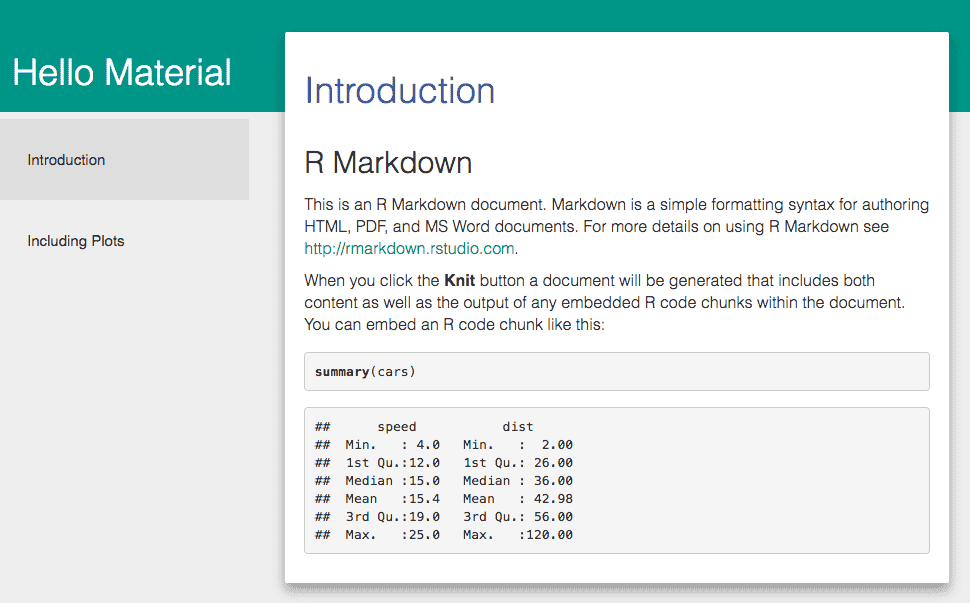
The Material Design theme in the rmdformats package.
These output formats have some additional features such as responsiveness and code folding. Please refer to the GitHub repository of the rmdformats package for more information: https://github.com/juba/rmdformats.
Section 9.3 Shower presentations
Shower (https://github.com/shower/shower) is a popular and customizable HTML5 presentation framework. See Figure 9.3 for what it looks like.
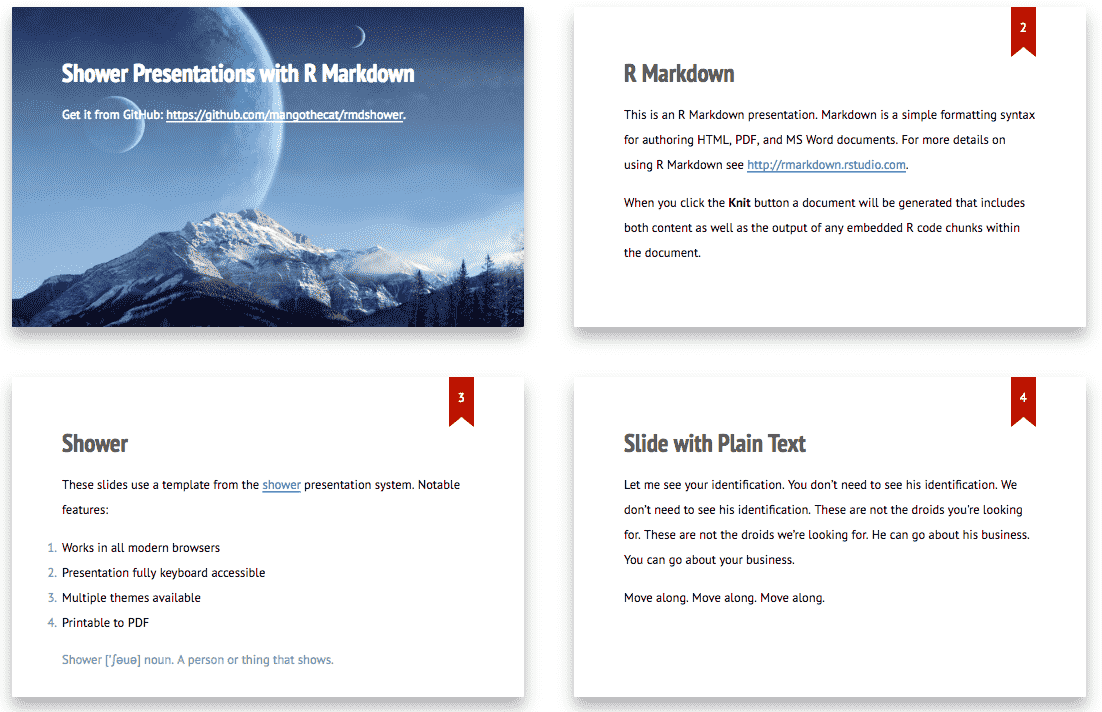
A few sample slides created via the Shower presentation framework.
The R package rmdshower (https://github.com/mangothecat/rmdshower) is built on top of Shower. You may install it from GitHub:
devtools::install_github("mangothecat/rmdshower")
You can create a Shower presentation with the output format
rmdshower::shower_presentation, e.g.,
---
title: "Hello Shower"
author: "John Doe"
output: rmdshower::shower_presentation
---
See the help page
?rmdshower::shower_presentation for all possible options of this format.

