Chapter 13 Journals
Academic journals often have strict guidelines on the formatting for submitted articles. As of today, few journals directly support R Markdown submissions, but many support the LaTeX format. While you can convert R Markdown to LaTeX (see Section 3.3), different journals have different typesetting requirements and LaTeX styles, and it may be slow and frustrating for all authors who want to use R Markdown to figure out the technical details about how to properly convert a paper based on R Markdown to a LaTeX document that meets the journal requirements.
The rticles package [25] is designed to simplify the creation of documents that conform to submission standards. A suite of custom R Markdown templates for popular journals is provided by the package such as those shown in Figure 13.1.
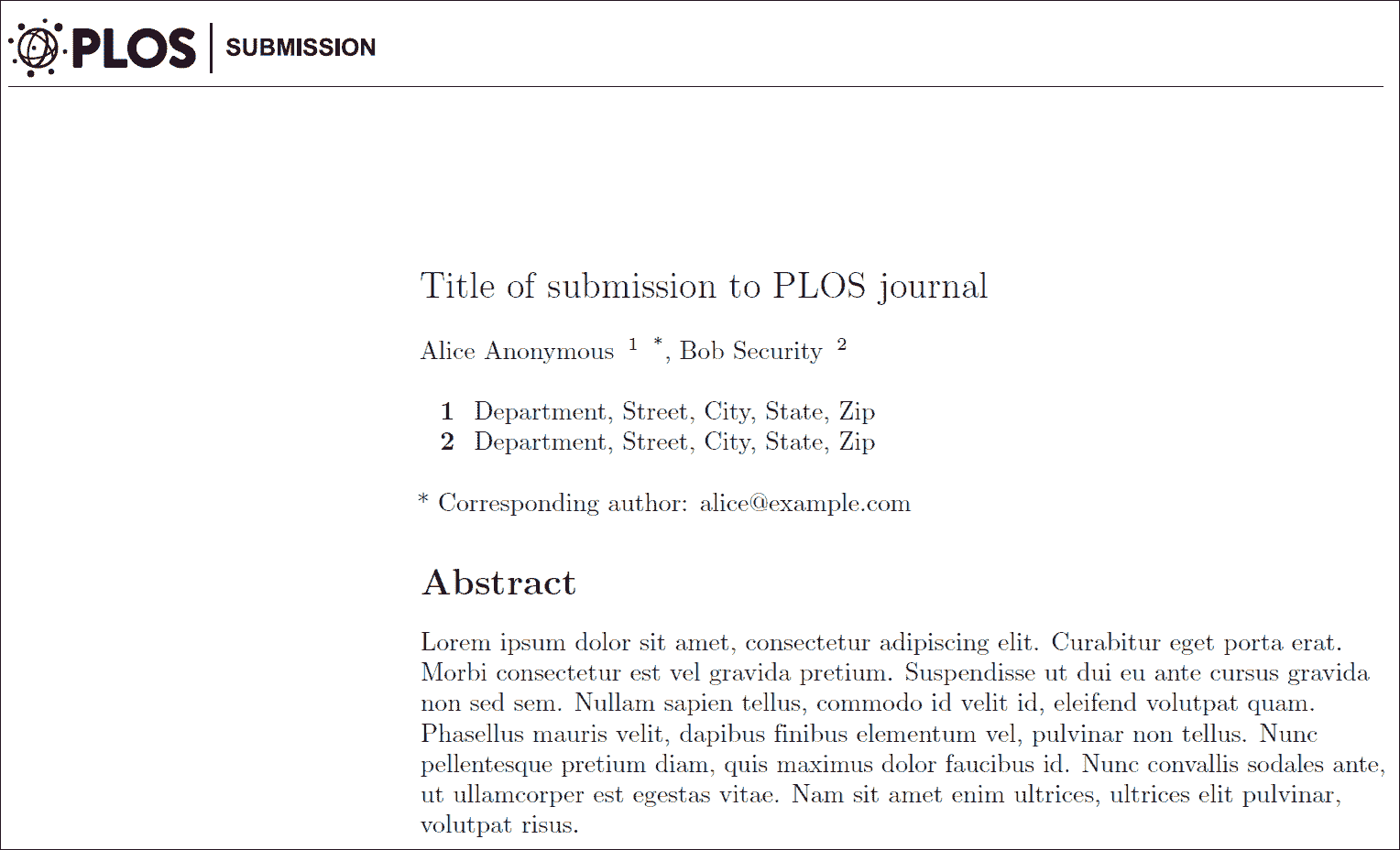
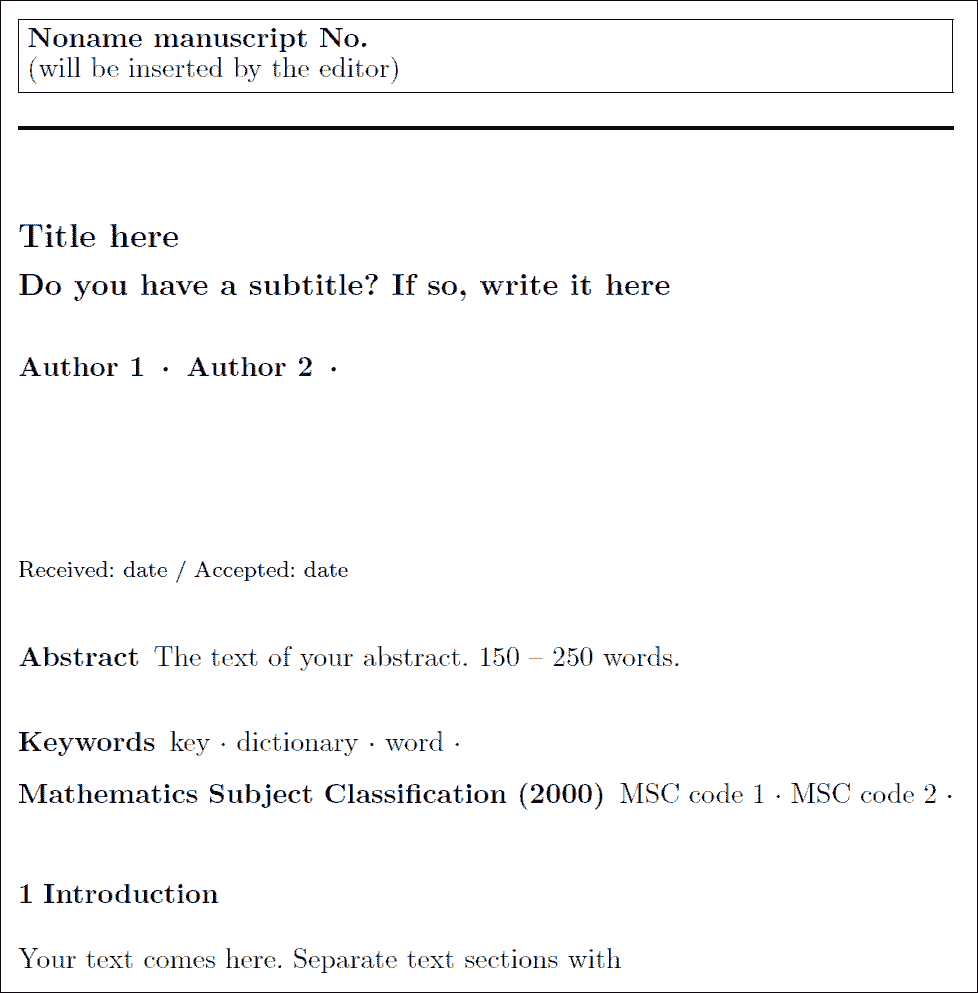
Two journal templates in the rticles package (PLOS and Springer).
Understanding of LaTeX is recommended, but not essential, to use this package. R Markdown templates may sometimes inevitably contain LaTeX code, but usually we can use the simpler Markdown and knitr syntax to produce elements like figures, tables, and math equations as explained in Chapter 2.
Section 13.1 Get started
You can install and use rticles from CRAN as follows:
# Install from CRAN
install.packages("rticles")

# Or install development version from GitHub
devtools::install_github("rstudio/rticles")
We would recommend the development version of the package from GitHub, as it contains the most up-to-date versions along with several new templates.
If you are using RStudio, you can easily access the templates through
File -> New File -> R Markdown. This will open the dialog box where you can select from one of the available templates as shown in Figure 13.2.
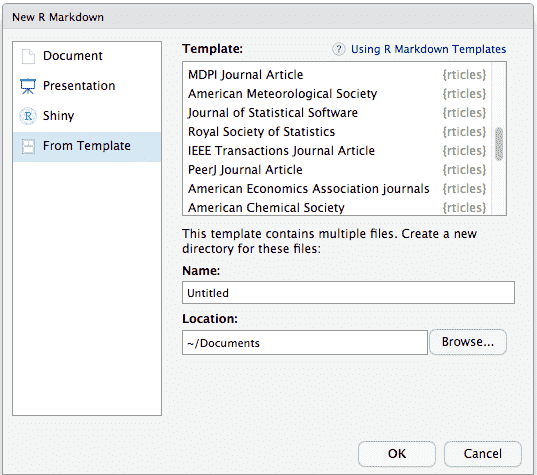
The R Markdown template window in RStudio showing available rticles templates.
If you are using the command line, you can use the
rmarkdown::draft() function, which requires you to specify a template using the journal short name, e.g.,
rmarkdown::draft(
  "MyJSSArticle.Rmd", template = "jss", package = "rticles"
)
Section 13.2 rticles templates
The rticles package provides templates for various journals and publishers, including:
-
JSS articles (Journal of Statistical Software)
-
R Journal articles
-
CTeX documents
-
ACM articles (Association of Computing Machinery)
-
ACS articles (American Chemical Society)
-
AMS articles (American Meteorological Society)
-
PeerJ articles
-
Elsevier journal submissions
-
AEA journal submissions (American Economic Association)
-
IEEE Transaction journal submissions
-
Statistics in Medicine journal submissions
-
Royal Society Open Science journal submissions
-
Bulletin de l’AMQ journal submissions
-
MDPI journal submissions
-
Springer journal submissions
The full list is available within the R Markdown templates window in RStudio, or through the function
rticles::journals():
rticles::journals()
##  [1] "acm"            "acs"            "aea"
##  [4] "agu"            "ajs"            "amq"
##  [7] "ams"            "arxiv"          "asa"
## [10] "bioinformatics" "biometrics"     "copernicus"
## [13] "ctex"           "elsevier"       "frontiers"
## [16] "glossa"         "ieee"           "ims"
## [19] "informs"        "iop"            "isba"
## [22] "jasa"           "jedm"           "joss"
## [25] "jss"            "lipics"         "lncs"
## [28] "mdpi"           "mnras"          "oup_v0"
## [31] "oup_v1"         "peerj"          "pihph"
## [34] "plos"           "pnas"           "rjournal"
## [37] "rsos"           "rss"            "sage"
## [40] "sim"            "springer"       "tf"
## [43] "trb"            "wellcomeor"
Section 13.3 Using a template
Templates have an extended YAML section compared to the basic R Markdown template, which allows you to specify additional details relevant to the custom template. Below is an example of the YAML section for the Springer template:
title: Title here
subtitle: Do you have a subtitle? If so, write it here
titlerunning: Short form of title (if too long for head)
authorrunning:
  Short form of author list if too long for running head
thanks: |
  Grants or other notes about the article that should go
  on the front page should be placed here. General
  acknowledgments should be placed at the end of the article.
authors:
  - name: Author 1
    address: Department of YYY, University of XXX
    email: abc@def
  - name: Author 2
    address: Department of ZZZ, University of WWW
    email: djf@wef
keywords:
  - key
  - dictionary
  - word
MSC:
  - MSC code 1
  - MSC code 2
abstract: |
  The text of your abstract.  150 -- 250 words.
bibliography: bibliography.bib
output: rticles::springer_article
As the Rmd documents are built using customized templates, you may not be able to use the YAML metadata to control the layout of the document as described in Section 3.3, unless the template supports such metadata. For example, adding
toc: true may not add a table of contents. Commands that control the building process may still be used though, including keep_tex: true, or those that configure knitr chunk options (e.g., fig_width).
Section 13.4 LaTeX content
As the only output format of the rticles formats is PDF, the content of the documents may include raw LaTeX formatting. This means you may use LaTeX to produce figures and tables (if you have to), e.g.,
\begin{figure}[ht]
\centering
\includegraphics[width=\linewidth]{foo}
\caption{An example image.}
\label{fig:foo}
\end{figure}
Unless you have specific requirements for using LaTeX, we recommend that you use the R Markdown syntax. This keeps you work generally more readable (in terms of the source document), and less prone to formatting errors. For example, the above code block would be better represented as:
```{r foo, out.width="100%", fig.cap="An example image."}
knitr::include_graphics("foo.png")
```
Section 13.5 Linking with bookdown
As explained in Section 12.3, bookdown offers several extensions to the Markdown syntax, which can be particularly useful for academic writing, including cross-referencing of figures and tables. All rticles output formats are based on
rmarkdown::pdf_document, and we can use them as the “base formats” for bookdown::pdf_book, e.g.,
output:
  bookdown::pdf_book:
    base_format: rticles::peerj_article
You can substitute
rticles::peerj_article with the template you actually intend to use.
Section 13.6 Contributing templates
If you take a look at the GitHub repository of rticles (https://github.com/rstudio/rticles), you will see that a lot of the templates have been contributed by the R community. If you are interested in improving them or adding more journal templates, you may want to read Chapter 17, which outlines how a template can be made for R Markdown. Basically these templates are defined to translate the Pandoc variables from the YAML frontmatter and the body of the R Markdown document into LaTeX.

