Chapter 11 HTML Documentation for R Packages
R has a built-in HTML help system that can be accessed via
help.start(). From this system, you can see the HTML help pages of functions and objects in all packages, as well as other information about packages such as the DESCRIPTION file and package vignettes. However, this system is usually dynamically launched (via a local web server), and it is not straightforward to turn it into a static website that can be viewed without starting R.
The pkgdown package [22] makes it easy to build a documentation website for an R package, which can help you organize different pieces of the package documentation (e.g., README, help pages, vignettes, and news) with a more visually pleasant style. The navigation can also be easier for users than R’s built-in help system. This website can be published to any web server (e.g., GitHub Pages or Netlify). An example is pkgdown’s own website: https://pkgdown.r-lib.org (see Figure 11.1).
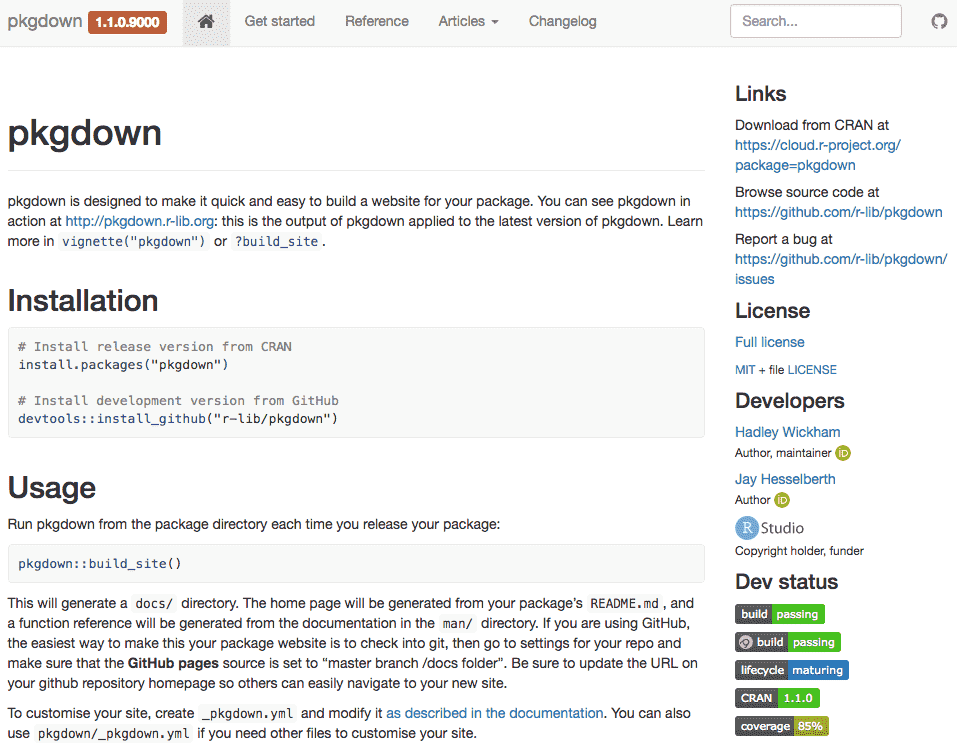
A screenshot of the pkgdown website.
Section 11.1 Get started
You can install pkgdown from CRAN, or its development version from GitHub, and find more information from its GitHub repository (https://github.com/r-lib/pkgdown).
install.packages("pkgdown")

# Or the development version
devtools::install_github("r-lib/pkgdown")
After it is installed, you can call the function
pkgdown::build_site() in the root directory of your source package. It will build a website to the docs/ directory, which can be turned into an online website via GitHub Pages or Netlify.
Section 11.2 Components
A pkgdown website consists of these components: the home page, function reference, articles, news, and the navigation bar. You may configure these components via a file
_pkgdown.yml.
Subsection 11.2.1 Home page
The home page is generated from the first existing file of the following files in your source package:
-
index.Rmd -
README.Rmd -
index.md -
README.md
Other meta information about the package, such as the package license and author names, will be displayed automatically as a sidebar on the home page.
Subsection 11.2.2 Function reference
The reference pages look like R’s own help pages. In fact, these pages are generated from the
*.Rd files under man/. Compared to R’s own help pages, pkgdown offers a few more benefits: the examples on a help page (if they exist) will be evaluated so that you can see the output, and function names are automatically linked so you can click on a name to navigate to the help page of another function. What is more, pkgdown allows you to organize the list of all functions into groups (e.g., by topic), which can make it easier for users to find the right function in a list. By default, all functions are listed alphabetically just like R’s help system. To group functions on the list page, you need to provide a reference key in _pkgdown.yml, e.g.,
reference:
  - title: "One Topic"
    desc: "These functions are awesome..."
    contents:
      - awesome_a
      - awesome_b
      - cool_c
  - title: "Another Topic"
    desc: "These functions are boring..."
    contents:
      - starts_with("boring_")
      - ugh_oh
As you can see from the above example, you may list the names of functions in the
contents field, or provide a pattern to let pkgdown match the names. There are three ways to match function names: starts_with() to match names that start with a string, ends_with() for an ending pattern, and matches() for an arbitrary regular expression.
Subsection 11.2.3 Articles
Package vignettes in the R Markdown format under the
vignettes/ directories will be built as “articles” for a pkgdown-based website. Note that Rmd files under subdirectories will also be built. The list of articles will be displayed as a drop-down menu in the navigation bar.
If you have a vignette that has the same base name as the package name (e.g., a vignette
foo.Rmd in a package foo), it will be displayed as the “Get started” menu item in the navigation bar.
Subsection 11.2.4 News
If the source package has a news file
NEWS.md, it will be parsed and rendered to HTML pages that can be accessed via the “Changelog” menu in the navigation bar.
Subsection 11.2.5 Navigation bar
The navigation bar in pkgdown is based on the rmarkdown site generator. You can learn how to customize it from Chapter 10 (Websites), in the section titled "Site navigation", if you are not satisfied by the default navigation bar. Please note that you need to specify the
navbar field in _pkgdown.yml instead of _site.yml.

